Remote updates in Raspberry Pi Connect – a step toward full device management
Remote updates in Raspberry Pi Connect – a step toward full device managementDate of publication: 08-05-2026 🕒 8 min read
Raspberry Pi Connect provides a secure and practical method of remote access to Raspberry Pi devices, regardless of their physical location. The solution is designed to operate reliably even in complex network environments — including setups behind firewalls or in cases where the device’s IP address changes dynamically. This ensures stable connectivity without the need for additional network configuration.
The platform supports both remote desktop and command-line access. While the graphical interface enables full control over the system, the remote shell offers a more lightweight and responsive alternative, particularly useful for administrative tasks and quick interactions. Importantly, access to both interfaces is handled directly through a web browser, eliminating the need for dedicated client software.
Building on these capabilities, Raspberry Pi Connect is now being extended with a new feature: remote software updates. This functionality has been under development for several months, with the primary objective of simplifying the process of maintaining and updating devices — especially in distributed environments where direct access is limited or impractical.


Remote updates – extending existing capabilities
Users of Raspberry Pi Connect can already update their devices using standard methods — either through the Software Updates tool available in the system interface or by executing typical package management commands such as apt upgrade.
The introduction of remote over-the-air (OTA) updates significantly expands these possibilities. Updates can now be initiated without establishing an active Connect session, which simplifies device maintenance and reduces the need for manual interaction.
An additional advantage of this approach is the integration with Connect infrastructure. Update requests are handled via the platform, meaning that the target device does not have to be powered on at the moment the update is scheduled. The process will be executed automatically once the device reconnects to the network.
Key terminology
To better understand the remote update workflow, it is useful to define two core concepts used within the system:
- Artifact – a package containing the software update itself or instructions required to perform a specific update operation.
- Deployment – the process of installing a given artifact on a device; a single artifact may be deployed multiple times, with each instance treated as a separate operation.
Remote update procedure – step by step
To perform a remote update using Raspberry Pi Connect, the device must be running a Trixie-based version of Raspberry Pi OS. The process consists of several clearly defined steps:
- Install the required packages, including the latest version of rpi-connect and the OTA extension:
$ sudo apt update
$ sudo apt install rpi-connect rpi-connect-ota
Or, in the case of a lightweight setup:
$ sudo apt update
$ sudo apt install rpi-connect-lite rpi-connect-ota
- Enable the experimental OTA update functionality via the command-line interface (authentication will be required):
$ rpi-connect ota on
- Prepare an artifact, either by creating it locally or using a verified package provided by a trusted source.
- Host the artifact in a location accessible to the target device(s). The update is retrieved via a URL, and the resource does not need to be directly available to the Connect servers. In the case of publicly available artifacts, this step may already be completed.
- Register the artifact within the Connect web interface, providing its SHA-256 checksum to ensure data integrity and verify that the package has not been altered.
- Initiate the deployment using the “Deploy” function. A single artifact can be reused across multiple devices and deployment instances.
After deployment is triggered, its status is initially marked as “Pending”. If the device is currently online, the process will transition to “In progress”, and the system may reboot upon completion if required.
A successfully completed update is indicated by the “Succeeded” status (in some cases, a manual refresh of the interface may be necessary). If an issue occurs, the deployment will be marked as “Failed”, with detailed error information available for diagnostics.
Pending deployments can be cancelled manually or will be automatically overridden if a new deployment is queued for the same device.
A/B update model – ensuring system reliability
In many real-world applications, Raspberry Pi devices operate in locations where physical access is limited or inconvenient — for example in industrial installations, monitoring systems, or embedded deployments. In such scenarios, maintaining system reliability during updates is critical, as a failed update may result in loss of connectivity and require manual intervention.
To address this challenge, a robust update strategy must include not only the ability to deploy new software, but also a mechanism for automatic rollback in case of failure.
How the A/B scheme works
A widely adopted solution is the A/B update scheme, which requires maintaining two separate system environments on the device:
- an active system currently in use,
- an alternative slot reserved for updates
During the update process, the new software is installed in the inactive slot. Upon reboot, the device starts from the updated environment, but without immediately committing to it as the default.
If the system initializes correctly and operates as expected, the update is confirmed and the new slot becomes active. In case of failure — such as a crash or unexpected reboot — the device can automatically revert to the previous, stable version. This mechanism significantly reduces the risk associated with remote updates and ensures continuity of operation.
Hardware and system requirements
Implementation of the A/B update model relies on several basic hardware features:
- the ability to store a small amount of state information that persists across reboots,
- a watchdog mechanism capable of triggering a system restart if the software becomes unresponsive.
These capabilities are available on all Raspberry Pi platforms.
However, the software layer also plays a key role. The operating system image must be specifically prepared to support the A/B structure, including dedicated partitions for both system slots and persistent data storage. Standard Raspberry Pi OS images do not currently include such a configuration by default.
Image preparation and deployment
For developers building solutions based on Raspberry Pi, the rpi-image-gen tool provides a practical way to create system images that support the A/B update model.
This approach enables the implementation of reliable remote update mechanisms, including OTA workflows via Raspberry Pi Connect. Detailed guidance on preparing such images and deploying updates is available in dedicated technical resources and community materials.
Beyond updates – executing custom tasks
Although artifacts and deployments are primarily associated with software updates, their functionality is not limited to this use case. In practice, they can be used to execute arbitrary operations on remote devices.
An artifact may include one or more scripts, along with supporting data files required during execution. These scripts are run with root privileges, which allows full access to the system resources and file structure.
This approach enables not only standard update operations (e.g. apt upgrade), but also more advanced or customized workflows. For example, an artifact may contain an archive with application files and a script responsible for extracting and installing them. At the same time, the mechanism can be used for simpler tasks, such as triggering a specific function on the device or controlling connected hardware (e.g. activating an LED).
Creating a custom artifact – example workflow
The process of preparing and deploying an artifact is straightforward and can be implemented in several steps:
- Prepare a script defining the operation to be performed. Below is an example of an artifact executing a system upgrade:
#!/bin/sh
export DEBIAN_FRONTEND=noninteractive
apt update
if apt -y -o DPKG::Options::="--force-confnew" upgrade > output.txt; then
    if [ -r /var/run/reboot-required ]; then
        echo Rebooting to finish the upgrade
        exit 2 # EXIT_REBOOT
    fi
else
    echo Upgrade failed:
    echo
    cat output.txt
    exit 1 # EXIT_FAILURE
fi
echo Upgrade complete
exit 0 # EXIT_SUCCESS
The upgrade command is configured to run in a non-interactive mode, ensuring compatibility with automated execution. Save the script as aptupgradescript.
- Create a control file in YAML format (e.g. aptupgrade.yaml) that defines the artifact structure:
# Run apt upgrade on a remote device
artefact:
  name: aptupgrade
  version: 1.0
  device_type: rpi

payloads:
- name: aptupgradescript
  type: script
- Use the otamaker utility to package the artifact into a compressed format:
$ otamaker aptupgrade.yaml
Contents:
  _contents_.yaml
  aptupgradescript

Artefact: aptupgrade.tar.zst
SHA256:   861dc9c0a04d458a918de89cef1ddfa60dad4c30fa7f4…
The process generates a Zstandard-compressed file along with a checksum used for verification.
- Identify the IP address of the host machine within the local network:
$ hostname -I
- Start a simple HTTP server to make the artifact accessible:
$ python3 -m http.server 8000 --directory
In a typical setup, this would be a separate host machine, although in small-scale environments it can be the same device.
- In the Raspberry Pi Connect interface, use the “Create and deploy” option to register the artifact, providing the corresponding URL and SHA-256 checksum.

- Once registered, the artifact is automatically deployed to the target device. The execution may take some time, depending on the operation performed, and in some cases a system reboot will be required to complete the process.
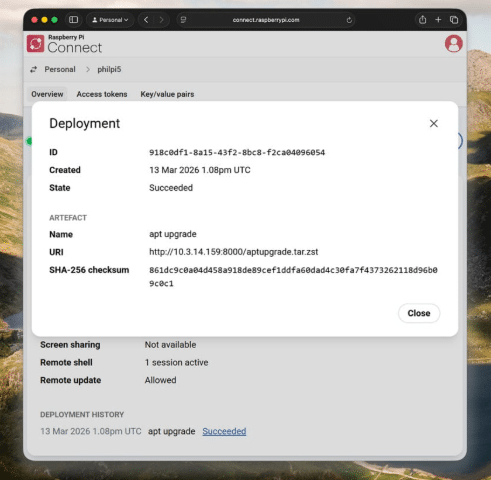
This workflow demonstrates how Raspberry Pi Connect can be used not only for updates, but also as a flexible tool for remote task execution and device management.
Tools and documentation
The otamaker utility is distributed as part of the rpi-connect-ota package and serves as the primary tool for building update artifacts.
For users working outside the Raspberry Pi environment, the utility is also available via the official GitHub “utils” repository. This repository includes additional resources, such as preliminary documentation describing the structure, syntax, and capabilities of artifact definition files and associated scripts.
Current status and further development
The remote update functionality in Raspberry Pi Connect is currently in a beta stage, which means that certain limitations are still present. One of the most significant constraints is the lack of a built-in mechanism for directly retrieving the output generated by executed scripts.As a temporary solution, users can access execution logs by connecting to the device via the remote shell and running:
$ journalctl -t rpi-ota-connectorThis command allows inspection of logs related to OTA operations and provides insight into the execution process.
Future direction
Further development of the feature is expected to focus on improving usability and scalability. Planned enhancements include:
- availability of predefined, publicly accessible update artifacts (e.g. standardized system updates),
- deeper integration with Connect for Organisations,
- advanced device selection and filtering mechanisms.
These improvements will enable efficient management of larger device fleets, allowing updates to be deployed across multiple systems in a streamlined and controlled manner.
This positions Raspberry Pi Connect as an increasingly capable platform for centralized device management and remote maintenance in both professional and advanced DIY applications.
Transfer Multisort Elektronik (TME) is one of the world’s largest global distributors of electronic components, electrotechnical parts, workshop equipment, and industrial automation. The catalog includes over 1,300,000 products from 1,300 leading manufacturers. TME’s modern logistics centers in Łódź and Rzgów (Poland), with a combined area of over 40,000 m², ship nearly 6,000 packages daily to customers in more than 150 countries.
TME also invests in the development of knowledge and skills of young engineers and electronics enthusiasts through the TME Education project, and supports the tech community by organizing the TechMasterEvent series, promoting innovation and experience exchange.